
Rockstar Casino App: How to Install and Play on Mobile
Here’s the thing, we have built our platform so you can take us anywhere without hunting for an app store. The Rockstar casino app doesn’t live in Google Play or the App Store, because we run on a progressive web app (PWA). Reviews by independent sites stress that there is no native mobile app and advise players to set up a PWA shortcut for Android and iOS to enjoy quick access with app‑like functionality. That means you get the same games, bonuses and payments in your browser, and you can pin the site to your home screen for one‑tap access. The mobile layout is fully responsive and works on any phone or tablet.
Our platform supports thousands of slots, crash games, jackpots, live dealer tables and bonus‑buy titles. Because everything runs in HTML5, there is no need to install extra software or a Rockstar casino apk. You log in through your browser or shortcut and play immediately.
How to Download and Install Rockstar Casino App
You might see ads for a rockstar casino app download, but don’t waste time searching app stores. Instead, use our PWA installation options for a rockstar casino app download that starts прямо from your browser, not from an app store. Installation takes seconds and adds the casino icon to your home screen.
iOS Installation Guide (iPhone and iPad)
Our rockstar casino iOS experience runs in Safari. To install:
- Open Safari and visit our site.
- Tap the share icon (square with an arrow).
- Scroll down and select Add to Home Screen.
- Confirm by tapping Add.
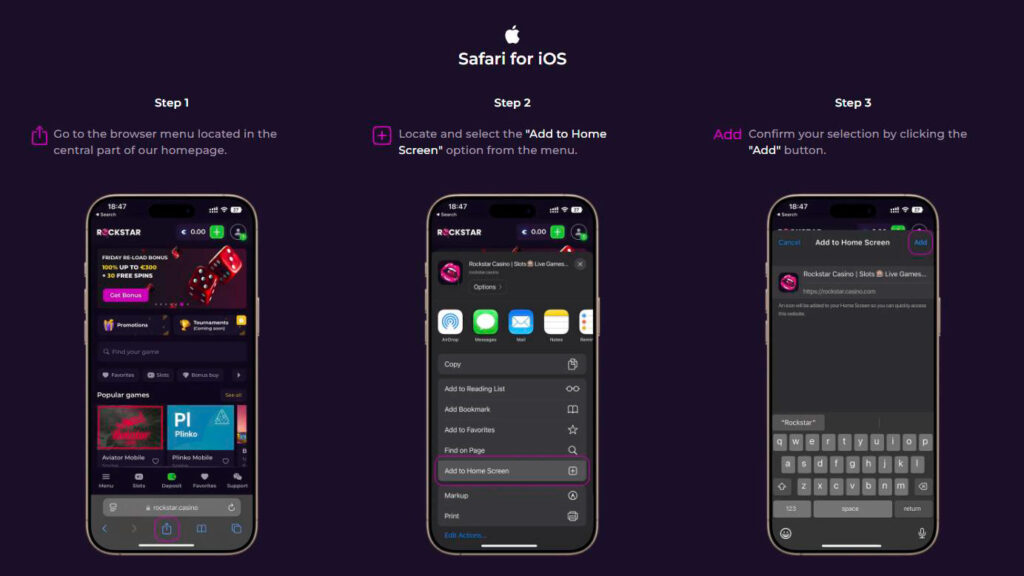
These steps match independent tutorials that explain how iOS users can tap the share menu in Safari, choose “Add to Home Screen” and confirm to create a PWA shortcut. Within moments you’ll see the rockstar casino app icon on your iPhone or iPad. Launching it opens a full‑screen view that feels like a native app and uses very little storage.
Android Installation Guide
On Android, the process is similar, and our rockstar casino android app works as a browser-based PWA shortcut rather than a store app. To set up the rockstar casino android app (our PWA shortcut):
- Open Chrome and go to our site.
- Tap the three‑dot menu in the top‑right corner.
- Choose Install App or Add to Home Screen.
- Tap Install and wait for confirmation.
A French review of our mobile version gives identical instructions: Android users open the menu, choose “Installer l’application” or “Ajouter à l’écran d’accueil” and confirm. The icon will appear on your home screen and launch the casino in a dedicated window. There is no separate rockstar casino apk to sideload, so you avoid security risks.
Desktop Installation
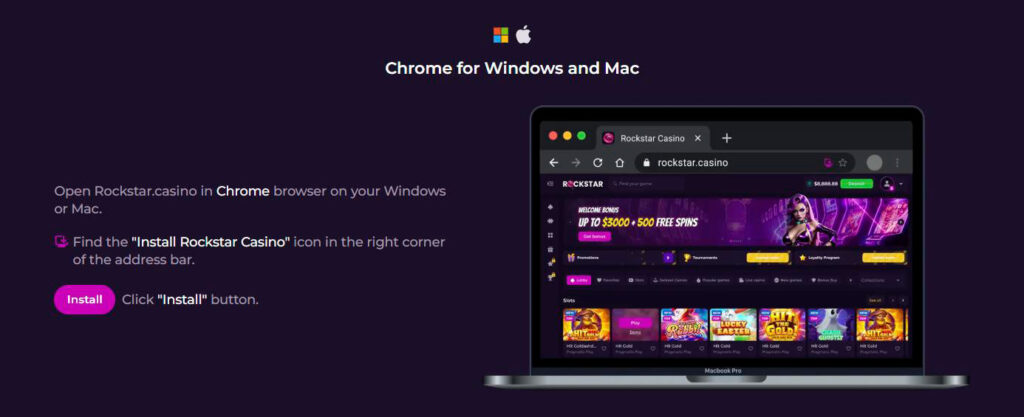
If you play on a laptop or desktop, you can still install our PWA. In Chrome on Windows or Mac, a small Install Rockstar Casino icon appears in the address bar. Click it and confirm. The site will be added to your applications menu, giving you a standalone window like an app. This option is also highlighted in reviews: to install on Windows or Mac, open the site with Chrome and click the Install Rockstar Casino icon.
Registration and Login via the Rockstar Casino App
Signing up through the rockstar casino app download shortcut is the same as on desktop. Tap Sign Up, enter your email and password, choose your currency and fill in your personal details, then confirm via email. Once your account is active, you can log in from any device with the same credentials. If you already have an account, tap the login button on the PWA or browser, enter your email and password, and you’re in.
Games Available on the Rockstar Casino Mobile App
Our mobile lobby mirrors the desktop site. You can browse by categories or search for titles just as you would on a computer.

Slots, Crash Games and Jackpots on Mobile
Mobile players can spin thousands of slots, including Megaways, feature‑buy and progressive jackpot games. Crash games and instant‑win titles load instantly, and the interface scales to small screens without losing the full game features. Because the PWA uses the same code base, there is no difference between mobile and desktop versions.
Live Casino on Mobile
If you enjoy live dealer action, our mobile platform hosts hundreds of live tables of blackjack, roulette, baccarat and game shows. Streaming quality adapts to your connection, and you can switch between portrait and landscape. External reviews confirm that the mobile site works seamlessly on smartphones and tablets.
Bonus Buy Games
Many of our slots include bonus‑buy features, allowing you to purchase free‑spin rounds directly. These options work on mobile exactly as on desktop. You can filter for bonus‑buy titles or search by name.
Mobile Payments: Deposits and Withdrawals
Big plus, our mobile cashier is not a stripped-down copy of the desktop version. Once your rockstar casino app download is set up as a PWA shortcut, you can open the same payment area, switch between deposit and withdrawal tabs, and manage your balance without leaving the mobile flow.
Whether you play through rockstar casino ios or the rockstar casino android app, the payment process stays simple and secure. There is no separate rockstar casino apk for banking features, because everything runs inside the same protected mobile interface.
Crypto Payments on Mobile: Bitcoin, Ethereum, Tether
We accept major cryptocurrencies on mobile. According to the official payments page, crypto deposits start at €1 and can go up to €10,000, and processing is instant. Supported coins include Bitcoin (BTC), Ethereum (ETH), Litecoin (LTC), Tether (USDT), Binance Coin (BNB), TRON (TRX) and Ripple (XRP). Withdrawals start from €10 and are also processed instantly. There are no fees unless you request a withdrawal without wagering your deposit at least once then an 8 % fee applies.
Card Payments: Visa and Mastercard
If you prefer cards, Visa and Mastercard deposits on mobile start at €10 and are capped at €3,000, with instant processing. Card withdrawals start at €30 and take 2–5 business days. Standard limits allow €500 per day and €10,000 per month, while VIP players can cash out up to €6,000 per day and €60,000 per month. All transactions use SSL encryption, just like on desktop.
Conclusion
There’s no secret native app and no rockstar casino apk, but that’s by design. Our responsive PWA lets you enjoy the full casino on any device without downloads or updates. Whether you install the shortcut on iOS, Android or desktop, you get quick access to thousands of games, generous bonuses and secure crypto or card payments. If you’re looking for a reliable mobile casino experience, the rockstar casino app offers it in a way that fits your pocket.

Frequently Asked Questions
No. Independent reviews confirm that there is no native mobile app. Instead, you can install a PWA shortcut for Android and iOS to get an app‑like experience.
Open the site in Safari, tap the share icon, choose Add to Home Screen and confirm. A review of our mobile platform outlines these steps and notes that the icon appears within seconds.
No. There is no rockstar casino apk because we use a PWA. Installing the web app through your browser is the secure way to access the casino.
Mobile users can deposit and withdraw with crypto (BTC, ETH, LTC, USDT, BNB, TRX, XRP) and cards (Visa, Mastercard). Crypto deposits start from €1 and are instant, while card deposits start from €10.
No promo code is required for installation. However, some bonuses may require a promo code or bonus code when depositing. Always check the Promotions page before playing.